
What is the Amazon Buy Box officially called by Amazon?
Key Takeaways
- The Amazon Buy Box (now officially called the "Featured Offer") is the prominent "Add to Cart" and "Buy Now" section on every product page. Industry data suggests the vast majority of Amazon sales flow through it.
- Buy Box eligibility barely exists any more: Amazon began removing the seller-performance gate in July 2026, and by September 2026 it said it no longer maintains a seller eligibility requirement at all. New-condition inventory, stock on hand and an unsuppressed listing still put you in the auction, but getting in has never been the same thing as winning.
- Amazon's algorithm selects the winner based on landed price, fulfillment speed, and seller reliability -- not just lowest price.
- Your buy box percentage tells you how often your offer is featured. Private label sellers should aim for near 100%; resellers competing on shared listings should target 60-70%.
- You can track your buy box win rate for free with BuyBoxChecker.com, a product by AdBadger.com.
The Button That Makes or Breaks Your Amazon Business
Amazon itself describes the Featured Offer as the primary way customers add products to their cart, and third-party studies consistently estimate it captures the large majority of sales -- with many citing figures above 80% -- flowing through a single button on the product page.
If you are not the seller winning that button, your competitors are quietly taking your revenue. It does not matter how great your product is.
Whether you are launching your first private label product or managing a wholesale catalog of thousands of SKUs, the most important question you can answer is: what is the Amazon Buy Box, and how do you win it?
Understanding the true buy box meaning is not just about learning Amazon jargon. It is the foundation of every profitable selling strategy on the platform.
What Is the Amazon Buy Box, Exactly?
The Amazon Buy Box -- officially rebranded by Amazon as the "Featured Offer" -- is the prominent white section on the right side of every product detail page on desktop. On mobile (where most Amazon shopping happens), it sits directly below the product image. Inside this section are the two most important buttons in e-commerce: "Add to Cart" and "Buy Now."
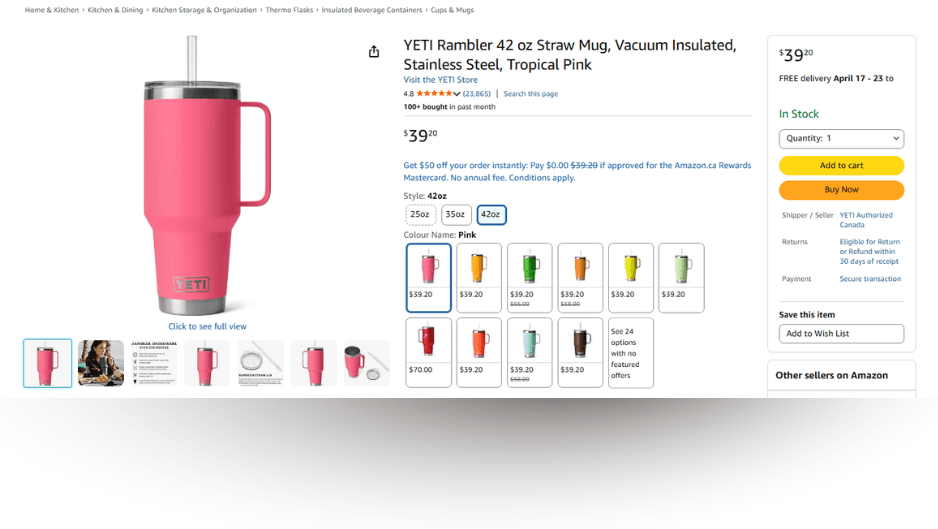
The community still universally calls it the "Buy Box," and so will we throughout this guide.
To understand why it matters, you need to understand how Amazon's catalog works.
Amazon operates a centralized catalog system. Unlike platforms where every seller creates their own listing, Amazon requires all sellers offering the same product to share one product detail page, identified by a single ASIN.
Competition gets fierce at this point. Twenty different merchants could be selling the exact same branded coffee maker on the same page. But only one seller is featured in the Buy Box at any given moment. When a shopper clicks "Add to Cart," the sale goes exclusively to that seller. The other 19 are buried behind a small "Other Sellers on Amazon" link that most shoppers never click.
Why Does the Amazon Buy Box Matter So Much?
Two forces make the Buy Box the single most important factor in your Amazon business.
Mobile Dominance: The "One-Tap" Reality
Mobile shoppers make up the majority of Amazon's traffic. On the mobile app and mobile browser, the Buy Box dominates the screen -- it is essentially the only visible purchasing option.
To buy from a different seller, a shopper would need to scroll past the main details, find the small "Other Sellers" link, tap it, and manually compare offers. In a world built around one-tap convenience, almost nobody does that.
If you are not in the Buy Box on mobile, you are invisible to most of your potential customers.
Sales Velocity: The Amazon Snowball Effect
Amazon's search ranking algorithms heavily favor sales velocity -- how fast and consistently your product sells.
Winning the Buy Box triggers a compounding flywheel:
More Buy Box wins → More sales → Better organic ranking → Even more Buy Box share
When you hold the Featured Offer, your conversion rate spikes. Amazon's algorithm registers the steady stream of sales and interprets your offer as relevant, reliable, and popular. It rewards you with better organic search placement, which drives more traffic, more sales, and ultimately a larger share of the Buy Box over time.
Losing it reverses the cycle just as quickly.
Who Is Eligible for the Amazon Buy Box in 2026?
Almost every seller. As of September 2026 Amazon says it no longer maintains a seller eligibility requirement, and offers from all sellers are evaluated for the Featured Offer. What is left are conditions on the offer itself: inventory listed in New condition, in stock and shippable to the buyer, and a listing with no active suppression. Amazon began removing the separate seller-performance check in July 2026, so account health scores inside the ranking rather than locking you out of it.
One of the most common mistakes is assuming that listing a product correctly means you are entitled to the Buy Box. There is a critical distinction between being eligible and actually winning.
Buy Box Eligibility Requirements
Think of buy box eligibility as the minimum bar to enter the competition. That bar got lower: Amazon began removing its separate seller-performance check in July 2026, so account metrics no longer lock you out of the auction before it starts. By September 2026 the bar was gone altogether: Amazon retired its Featured Offer eligibility help page and its current guidance says offers from all sellers are now eligible to be evaluated. What still puts an offer in the running is the offer itself:
- Professional Seller Account -- no longer required. We said until September 2026 that Amazon limited the Buy Box to Professional plans. Amazon has since removed the page that set that requirement and now says it maintains no seller eligibility requirement, so Individual plans are not excluded. Your plan still decides your fees and selling tools.
- New Condition Inventory -- Your product must be listed as "New." (A separate "Buy Used" box exists, but the primary high-volume button is for new items only.)
- In-Stock, Shippable Inventory -- Amazon will not feature an offer it cannot fulfill, and it deprioritizes offers well before they hit zero.
- No Active Listing Suppression -- A suppressed listing shows no Featured Offer to anyone, so nothing else matters until the suppression clears.
What no longer gates you: your Order Defect Rate (ODR), Pre-Fulfillment Cancel Rate, and Late Shipment Rate used to be a pass/fail check before your offer could compete. Since July 2026 that check is gone: Amazon scores seller performance inside the ranking instead, so weak metrics cost you the box on merit rather than barring you from it. They still govern account-health enforcement.
Meeting those four criteria does not mean you win. It means you are allowed to compete. For the current rules row by row, including what changed in 2026 and what did not, see the Buy Box eligibility checklist.
Actually Winning the Buy Box
If eligibility is your ticket into the arena, winning is the tournament itself.
Once you are eligible, you are placed into a pool of all other eligible sellers for that ASIN. Every time a customer loads the page, Amazon's algorithm evaluates every eligible offer in real time and selects a winner.
The seller with the best combination of price, fulfillment speed, and reliability wins that impression. If a competitor has faster shipping, a better landed price, or stronger account metrics, the algorithm hands the Buy Box to them instead.
Eligibility is step one. Winning requires outperforming the competition on the factors the algorithm actually weighs.
How Does Amazon Determine Who Wins the Buy Box?
Amazon's 2026 Featured Offer algorithm scores every eligible offer on three things and re-runs that score on each page view: fulfillment speed (how fast this buyer, at this address, would actually receive the item), landed price (item price plus shipping and handling, not the sticker price alone), and account health (on-time delivery, order defect rate, cancellations). No single factor wins on its own -- the highest combined score takes the button, which is why the cheapest offer regularly loses.
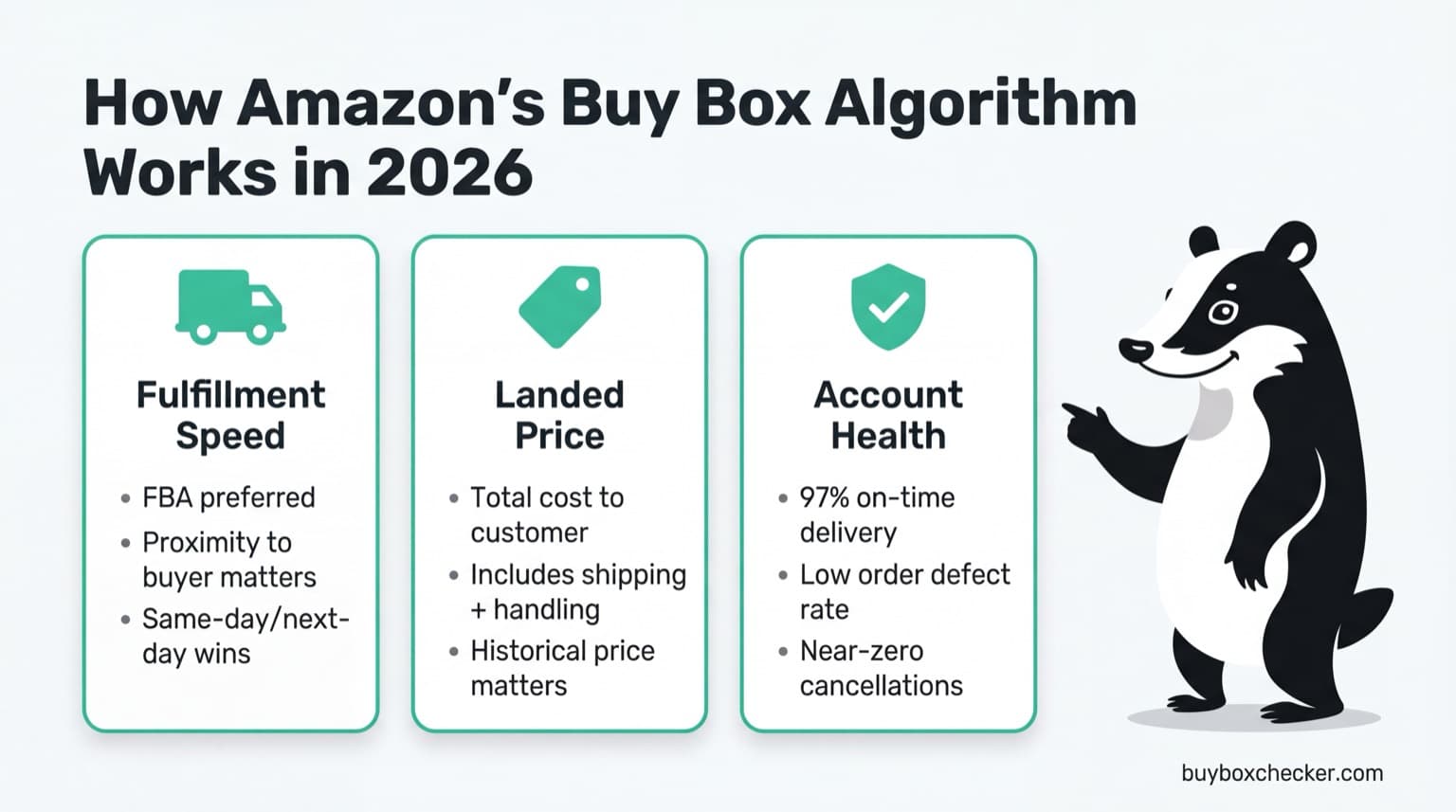
For years, sellers treated the Buy Box like a race to the lowest price. That strategy is dead.
The algorithm many in the Amazon seller community refer to as "A10" (note: this is community shorthand, not an official Amazon designation) is built around one core philosophy: lowest-risk selection. Amazon wants to guarantee a flawless customer experience every time. If your offer presents even a slight risk of a late delivery, cancellation, or poor service, the algorithm will pass you over for a more expensive but more reliable competitor.
Three factors dominate in 2026. For a deeper teardown of how the algorithm weighs each one, see our Amazon Buy Box algorithm deep-dive.
1. Fulfillment Speed and the Shipment Proximity Index
Fast shipping is no longer a bonus. It is a requirement. Offers using Fulfillment by Amazon (FBA) or Seller Fulfilled Prime (SFP) are heavily favored because they allow Amazon to guarantee delivery speeds.
But the algorithm goes further. It evaluates what's known as the Shipment Proximity Index -- essentially, how close your inventory is to the customer at the moment they load the page. A seller with inventory distributed across multiple regional fulfillment centers, enabling same-day or next-day delivery to a wider radius of buyers, will consistently outrank a seller whose stock sits in a single warehouse -- even if that seller has a lower price.
This is why Buy Box winners can vary by ZIP code. A seller with a warehouse in Dallas might hold the Buy Box for Texas shoppers, while a competitor with inventory in New Jersey wins it for customers in the Northeast. Seller Central's aggregate buy box percentage does not show you this. Tools like BuyBoxChecker.com let you track Buy Box ownership in specific ZIP codes so you can see exactly where you are winning and losing by geography.
If you use FBA, Amazon handles inventory distribution for you. If you self-fulfill, you need to think strategically about where your inventory is located relative to your customers.
2. Landed Price (Not Just Sticker Price)
Price still matters, but the algorithm evaluates landed price -- the total cost to the customer including product price, shipping, and handling.
This is a common trap. If you sell a product for $15 with $5 shipping, and a competitor sells it for $19 with free shipping, the algorithm views the $19 offer as equivalent or better. It also considers how your price compares to the product's historical pricing range on Amazon.
3. Account Health and the On-Time Delivery Rate
If you fulfill orders yourself (FBM), your account metrics are under a microscope. The most critical metric is your On-Time Delivery Rate (OTDR).
Amazon enforces a minimum 90% OTDR for seller-fulfilled orders -- at least 90 of every 100 packages must arrive on or before the promised delivery date, based on actual carrier scans rather than when you printed the label. Fall below it and Amazon can deactivate your at-risk listings.
But 90% is only the floor. Amazon recommends staying well above it, and because the algorithm rewards reliability, competitive sellers treat 95% to 97%+ as the real target. The closer you are to perfect, the more Buy Box share you earn, and the less share you give up while your metrics recover.
Need help with your Amazon advertising strategy to complement your Buy Box wins? AdBadger.com helps sellers optimize their PPC campaigns so that when you win the Buy Box, your ads are driving maximum profitable traffic to your listings.
Does the Amazon Buy Box Change by Location and ZIP Code?
This is not a theoretical edge case. Measuring location-level Buy Box ownership is exactly what Buy Box Checker does, so we can put real numbers to it. As of August 15, 2026, across the products actively tracked on our platform:
- We monitor 8,397 Buy Box positions across 1,775 unique ASINs and 116 delivery locations across the US, UK, Canada, and Ireland, on behalf of dozens of sellers, vendors, and agencies.
- We have logged 764,105 individual Buy Box checks since late January 2026.
- Right now, 33.9% of the product-location positions we track are not winning the Buy Box, either lost to another seller or suppressed by Amazon.
Here is the finding a single national percentage can never show you:
Of the products we check in more than one US location on a given day, 20.6% win the Buy Box in at least one location while simultaneously losing it or being suppressed in another.
For 20.6% of multi-location US products on any given day, in other words, the Buy Box is not the same for every shopper. Seller Central would report one blended, nationwide number and hide that split completely. That regional blind spot is the exact reason we built Buy Box Checker. If you want to compare the tools that surface it, we broke down the best Amazon Buy Box monitoring tools separately.
20.6%
of products checked in two or more locations on a given day showed a different Buy Box status across those locations that same day.
- Multi-location products checked per day
- 716
- Daily range
- 16.2% to 23.3%
- Window
- 18 days ending August 15, 2026
- Positions monitored
- 8,397
- Distinct ASINs
- 1,775
- Delivery locations
- 116
- Total checks logged
- 764,105
Zoom out from multi-location products to everything we track and the picture holds: 45.4% of all tracked products have at least one location where the Buy Box is lost or suppressed right now. If you sell in more than one region, the odds say at least one of your products is quietly losing somewhere as you read this.
45.4%
of every product we track currently has at least one location where the Buy Box is lost or suppressed.
- Products in sample
- 1,774
- Positions not currently winning
- 33.9%
- Delivery locations
- 116
We publish the underlying analysis rather than just the headline numbers. Two studies go deeper than this section can: our finding that price does not decide the Amazon Buy Box, and what we learned measuring how often a Buy Box check returns a stock warning.
What Are the Amazon Buy Box Rules in 2026?
There are really two sets of Amazon Buy Box rules: the eligibility rules that let you into the competition, and the ranking rules that decide who actually wins it. Here is the full picture in one place.
| Rule | Type | What Amazon requires |
|---|---|---|
| Professional Seller account | No longer required | Retired in September 2026. Amazon removed its Featured Offer eligibility page and now says offers from all sellers are evaluated, so Individual plans are not excluded. |
| New-condition inventory | Eligibility | The primary Buy Box is reserved for items listed as "New." |
| Healthy account metrics | Winning | Since July 2026 these are no longer checked before the auction. Amazon scores seller performance inside the ranking instead, so weak metrics lose the box on merit, and still drive account-health enforcement. |
| Fast, nearby fulfillment | Winning | FBA or Seller Fulfilled Prime and inventory close to the buyer win. This is why the winner changes by ZIP code. |
| Competitive landed price | Winning | Amazon weighs total cost (price plus shipping) against the historical price range, not just sticker price. |
| Reliability (OTDR) | Winning | 90% on-time delivery is the floor; competitive sellers hold 95-97%+ to earn more Buy Box share. |
Meet the eligibility rules and you are allowed to compete. Win on the ranking rules and you take the Featured Offer. For a deeper teardown of how Amazon weighs each ranking factor, see our Amazon Buy Box algorithm deep-dive.
How Do You Check Your Buy Box Percentage?
You cannot improve what you do not measure. Your buy box percentage tells you exactly how often your offer was the Featured Offer when a customer viewed your product page.
Finding it in Seller Central takes a minute:
- Log in to Amazon Seller Central
- Hover over the Reports tab in the top menu
- Select Business Reports
- In the left sidebar under "By ASIN," click Detail Page Sales and Traffic (or "by Child Item" for variations)
- Find the Buy Box Percentage column
This number tells you what share of page views featured your offer. Check it weekly at minimum.
Buy Box Percentage Benchmarks by Seller Type
It depends entirely on your business model:
Private Label Sellers (target: near 100%) -- If you are the only authorized seller of your product, your percentage should sit at or near 100%. A significant drop is a red flag. It usually means either unauthorized sellers (hijackers) have jumped onto your listing, or Amazon has suppressed your Buy Box because it detected a lower price for your product on another website.
Resellers and Wholesale (target: 60-70%) -- If you are competing against four other sellers with similar pricing and fulfillment, an equal split would be just 20%. Maintaining 60-70% in a competitive landscape means your pricing and fulfillment strategy is working well.
Track Your Buy Box Across ZIP Codes
Seller Central shows you an aggregate percentage, but it does not tell you where you are winning or losing. Since Amazon factors in delivery speed by region, your Buy Box share can vary dramatically by geography.
BuyBoxChecker.com tracks up to 10 ASINs across Austin and Denver on the free plan, and any ZIP codes you choose on a paid one. See exactly who holds the Buy Box in different regions, monitor changes over time, and spot problems before they eat into your sales. To check a single ASIN right now without signing up, use the free Buy Box checker. BuyBoxChecker is a product by AdBadger.com.
How Do You Win and Keep the Amazon Buy Box?
Once you understand the algorithm, here are seven strategies that put that knowledge into action. For the full playbook, step by step, see our guide to how to win the Amazon Buy Box.
- Use FBA whenever possible. It is the single biggest lever. Amazon trusts its own fulfillment network, and FBA offers get preferential treatment in the algorithm.
- Optimize your landed price, not just your sticker price. Factor in shipping costs. Free shipping with a slightly higher product price often beats a lower price with added shipping fees.
- Maintain flawless account health. Keep your OTDR above 97%, your ODR below 1%, and your cancellation rate near zero. Since July 2026 these are not eligibility requirements, but they decide how often you win, and the floors below them are where account-health enforcement starts.
- Distribute inventory across regions. Whether through FBA's inventory placement or your own multi-warehouse network, getting product closer to more customers gives you an algorithmic edge.
- Monitor your competitors' pricing. Use repricing tools to stay competitive without racing to the bottom. The goal is to be within a competitive range, not necessarily the cheapest.
- Protect your listings from hijackers. If you are a brand owner, enroll in Amazon Brand Registry. Monitor your listings for unauthorized sellers and file violations quickly.
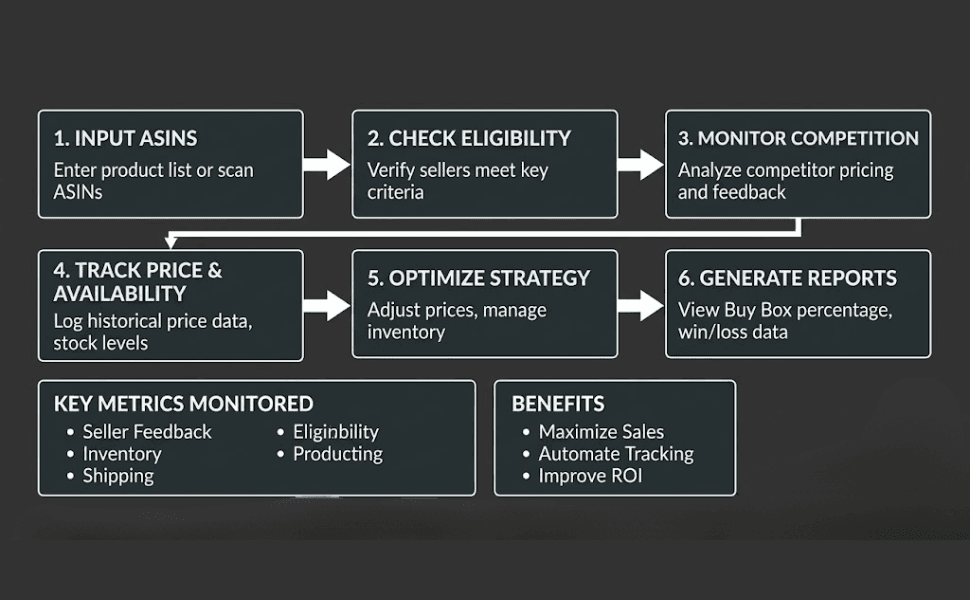
- Track your buy box percentage by region. An aggregate number in Seller Central does not tell the full story. Use a buy box tracker to see where you are winning and where you are losing.
Frequently Asked Questions
What does "buy box" mean on Amazon?
The buy box is the section on an Amazon product page that contains the "Add to Cart" and "Buy Now" buttons. When multiple sellers offer the same product, only one seller's offer is displayed in this section at a time. Winning the buy box means your offer is the one customers see and purchase from by default.
What is the Featured Offer on Amazon?
The Featured Offer is Amazon's official name for what sellers have always called the "Buy Box." Amazon rebranded it, but the concept is the same: it is the default purchasing option on a product page. When you see "Featured Offer" in Seller Central reports or Amazon documentation, it refers to the Buy Box.
Can FBM sellers win the Buy Box?
Yes. FBM (Fulfilled by Merchant) sellers can win the Buy Box, but it requires strong operational performance. You need to match FBA-level shipping speeds, offer competitive or free shipping, and maintain excellent account metrics -- especially an On-Time Delivery Rate at or above Amazon's 90% minimum, and ideally higher.
Why did my Buy Box suddenly disappear?
The most common cause is price suppression. Amazon continuously scans the internet. If its bots find your product listed at a lower price on another website (Walmart, your own Shopify store, etc.), or if your Amazon price spikes too far above the historical average, Amazon removes the Buy Box entirely. You will see only a "See All Buying Options" button instead. If it has already happened to you, our guide on why you lose the Amazon Buy Box and how to get it back walks through the full recovery checklist.
Does the Amazon Buy Box rotate between sellers?
Yes. When multiple sellers offer competitive pricing, fast shipping, and strong account health, Amazon's algorithm shares the Buy Box among them. The rotation is not an equal split -- it is weighted by who offers the best overall value and reliability. Better metrics earn a larger share of the rotation.
What is a good buy box percentage on Amazon?
It depends on your business model. If you are the only authorized seller of your own private label product, your buy box percentage should sit at or near 100%, and a significant drop usually means a hijacker has joined the listing or Amazon has suppressed the Buy Box over a lower price found elsewhere. If you are a reseller competing on a shared listing, 60-70% is strong -- against four other similarly priced sellers an equal split would be just 20%.
Why am I not winning the buy box?
Since July 2026 the usual answer is no longer that you are ineligible. Amazon began removing the standalone seller-performance check that month, and its announcement says every seller's offers are now in the running to be evaluated. The rollout is gradual, store by store, and Amazon says it completes across all stores by the end of 2026. So the usual diagnosis is now that you are in the auction and being outscored on landed price, delivery speed to that particular buyer, or account health. The other common cause is suppression, where Amazon shows nobody the Buy Box because it found a lower price for your product elsewhere. For the full diagnostic, see why you lost the Amazon Buy Box and how to get it back.
How often should I check my buy box percentage?
At minimum, check weekly. For competitive ASINs or during promotional periods, daily monitoring is better. Using a dedicated buy box tracker automates this and alerts you to changes so you are not caught off guard.
Win the Buy Box. Win on Amazon.
The Amazon Buy Box is not just another metric to watch. It is the foundation of your profitability on the platform.
Whether you are a private label brand defending your own listing or a wholesale reseller fighting for share in a competitive rotation, understanding how Amazon's risk-based algorithm evaluates your offer is what separates thriving businesses from everyone else.
The formula is straightforward: competitive landed price + fast fulfillment + strong account health = Buy Box wins.
Stop guessing. Start tracking. BuyBoxChecker.com monitors up to 10 ASINs across Austin and Denver on the free plan, and any ZIP codes you choose on a paid one -- so you can see exactly where you are winning, where you are losing, and what to fix.
A product by AdBadger.com, built by the team that helps Amazon sellers optimize every part of their advertising and Buy Box strategy.